How to evaluate inbound lead quality from a webhook
Generic pattern for any form or webhook that posts JSON: normalize the payload, call EchoStack once, branch automation on status — not on a single form field.
Outcome
Within seconds of submission you have:
status—QUALIFIED,PARTIAL,FAILED, orESCALATE(from your evaluation manifest)extracted_fields— BANT/MEDDIC/custom signals the playbook definesmissing_fields— what to ask for onPARTIALnext_action/next_instruction— optional routing hints for nurture or the rep queue
Your CRM, n8n, or Zapier workflow decides what fires; EchoStack only decides.
Prerequisites
- Eval API quickstart — create a lead qualification evaluation (
evaluation_id) and an org API key (esk_…) under Dashboard → API Keys - A webhook source (Typeform, Webflow, custom backend, HubSpot workflow HTTP action)
- An automation runner (n8n recommended — n8n integration)
Architecture
HTTP webhook (form submit)
    → Normalize fields to one text blob (or structured input array)
    → POST /v1/evaluate
    → Branch on status
        → QUALIFIED → owner assignment, high-priority deal stage
        → PARTIAL   → nurture / ask-for-fields sequence
        → FAILED    → tag disqualified, no owner
        → ESCALATE  → Slack / on-call (support-style evals)
EchoStack does not subscribe to your form vendor directly in the eval-only product — your webhook handler forwards submission data to the API.
Authentication
Every webhook call uses your organization API key and the evaluation you created in the quickstart:
- Header:
Authorization: Bearer esk_…(from Dashboard → API Keys) - Body: include
evaluation_id(fromPOST /v1/evaluationsor the dashboard)
Deployment webhook secrets (ech_dw_…) are not used for this flow.
Step 1 — Normalize the webhook body
Form vendors send different JSON. Convert to a single input entry (or a short array) the model can read.
Typeform-style (example):
// n8n Code node or your API route
const fields = $json.form_response?.answers ?? [];
const lines = fields.map(
  (a) => `${a.field.ref}: ${a.text ?? a.choice?.label ?? ""}`,
);
const content = "Form submission:\n" + lines.join("\n");
Generic key-value webhook:
const content =
  "Form submission:\n" +
  Object.entries($json)
    .filter(([k]) => !k.startsWith("_"))
    .map(([k, v]) => `- ${k}: ${v}`)
    .join("\n");
Keep PII policy in mind — only send fields your evaluation needs (company, role, budget signal, timeline). You do not need to forward internal IDs to EchoStack.
Step 2 — Call evaluate
curl (smoke test)
curl -sS -X POST "https://api.getechostack.com/v1/evaluate" \
  -H "Authorization: Bearer esk_YOUR_KEY" \
  -H "Content-Type: application/json" \
  -d '{
    "evaluation_id": "<your-evaluation-uuid>",
    "input_type": "form",
    "input": [
      {
        "role": "user",
        "content": "Form submission:\n- company: 80-person SaaS\n- role: VP Sales\n- budget: Approved Q2\n- timeline: Live before board review in 6 weeks"
      }
    ],
    "options": { "request_next_action": true }
  }'
input_type choice
input_type |
Use when |
|---|---|
form |
Single-shot submission text (demo request, contact form) |
transcript |
Multi-turn chat-style content; also works if you label lines user / agent |
For most webhooks, form with one user message is enough. Use HubSpot forms if you already standardize on HubSpot field names.
n8n Webhook → Evaluate
- Webhook node — POST, respond immediately or after evaluate (see idempotency below).
- Code node — build
contentstring from$json. - EchoStack Evaluate node — org credential (
esk_…), setevaluation_idon the node or credential. - Switch on
$json.status— map each branch to CRM / Slack / email.
Import the full pattern from n8n integration and the example workflow.
Step 3 — Branch on status (production routing)
status |
Typical automation |
|---|---|
QUALIFIED |
Create/update CRM record, assign owner, book meeting link |
PARTIAL |
Enroll nurture, send “missing budget/timeline” email, do not assign senior AE |
FAILED |
Tag disqualified, archive, or low-priority list |
ESCALATE |
Pager / Slack (common on support triage evals) |
Use missing_fields on PARTIAL to pick which follow-up template to send. Use next_action when you enabled request_next_action: true.
Do not branch only on a single extracted field unless you have verified it is stable — status is derived from required fields in the manifest, which is the procedural contract you want in production.
Step 4 — Verify in the dashboard
- Run the webhook once (n8n Test workflow or curl).
- Open Dashboard → Activity (or Test evaluation on the evaluation you created).
- Confirm a log row appears with the expected
status.
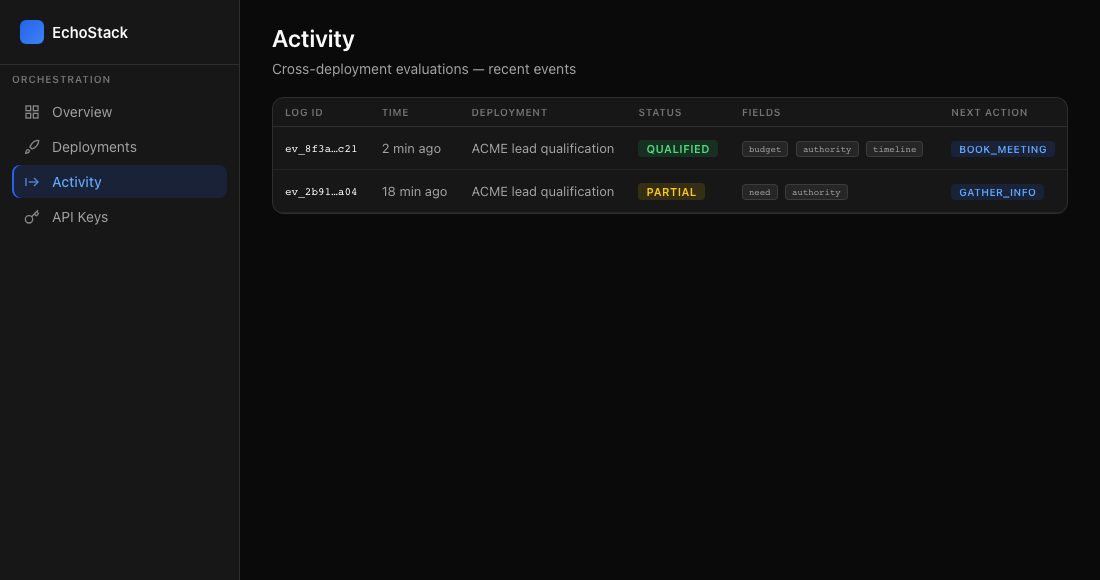
Dashboard → Activity — each evaluate call logs a row with status, extracted fields, and next_action.
If you signed up from docs, evaluate calls may include guide attribution via X-EchoStack-Guide — useful when debugging which integration path is live.
Webhook retries and idempotency
Many form providers retry failed webhooks. Each retry issues another POST /v1/evaluate unless you dedupe.
Patterns:
- Return
200quickly after enqueueing evaluate (async worker calls EchoStack). - Dedupe on
submission_id/form_response.tokenin Redis or n8n static data before calling evaluate. - Accept duplicate evaluates but branch CRM nodes with “only if deal not exists” guards.
EchoStack evaluation logs help audit duplicates; they are not a dedupe store.
Failure reference
| Symptom | Likely cause | Fix |
|---|---|---|
| 401 Unauthorized | Wrong or rotated key | Regenerate esk_… in API Keys; update n8n credential |
| 400 validation | Malformed input or missing evaluation_id |
Send esk_… and a valid evaluation_id — see OpenAPI |
PARTIAL on strong-looking leads |
Required manifest fields not present in form | Add fields to form or relax required set in evaluation config |
| Slow webhook timeout | Evaluate latency | Respond 200 first; run evaluate in background |
Related guides
- Inbound lead qualification API — shorter overview
- HubSpot forms — HubSpot-specific field mapping
- BANT vs MEDDIC vs custom in production
- EchoStack vs Zapier for qualification
Production checklist
-
evaluation_idcreated with the framework you intend (criteria guide) - Webhook normalizes all required signals into
content - Automation branches on
status, not gut-feel field thresholds -
PARTIALpath does not assign premium reps - Retries handled (idempotency or CRM guards)
- Dashboard shows evaluations on real traffic