Eval API quickstart
End-to-end path for the Evaluations API: create a durable evaluation once and call evaluate many times — or score immediately with ad-hoc Criteria (no create step).
Outcome
You authenticate with an org API key (esk_), run POST /v1/evaluate with either evaluation_id or nested criteria, and optionally log business outcomes on a durable Evaluation.
Prerequisites
- EchoStack account (sign in)
- An organization API key from Dashboard → API Keys
Templates (Checkpoint A)
| Template | Use case | Detectors |
|---|---|---|
intent_detect |
DM, chat, email, webhook | Pick ≥1 from: pricing_interest, purchase_interest, urgency, not_interested, needs_human |
lead_qualification |
Sales | Set framework to bant, meddic, spiced, or champ (full pack applied) |
support_triage |
Support | Default pack: issue_severity, customer_tier, time_sensitivity |
custom |
Any business use case | Define your own typed custom_detectors (presence / classification) with examples |
Custom evaluations
When none of the standard detectors fit, use template: "custom" and declare your own typed, example-anchored detectors. You never write a prompt — you declare what to detect and the platform authors a consistent prompt and enforces deterministic validation.
Two detector types:
presence— detect whether a signal is present. The result is thefoundflag.classification— classify the message into exactly one of a fixedcategoriesset. The extracted value is enum-validated; an out-of-set value is coerced to not-found and reported ininvalid_fields.
Every detector requires at least one examples entry (positives). These run as an assertion smoke test at create time: if a positive example does not match — or, for classification, lands outside its categories — creation fails so you catch a misconfigured detector before it ships.
non_examples (negatives, asserted as "not found") are presence-only. A classification detector always lands every input in a category, so there is no "not found" state to assert — sending non_examples on a classification detector is rejected at validation. To cover negatives there, add a catch-all category (e.g. none) and put those phrases in examples.
{
  "name": "Partnership routing",
  "template": "custom",
  "custom_detectors": [
    {
      "name": "competitor_mentioned",
      "type": "presence",
      "examples": [
        "we're currently using Acme",
        "switching away from a competitor"
      ],
      "non_examples": ["love your product"]
    },
    {
      "name": "partnership_inquiry",
      "type": "classification",
      "categories": ["reseller", "affiliate", "strategic", "none"],
      "examples": [
        "interested in your reseller program",
        "want to co-sell with you",
        "just a support question"
      ]
    }
  ],
  "escalation": {
    "triggers": [
      {
        "field": "partnership_inquiry",
        "values": ["strategic"],
        "required": false
      },
      { "field": "competitor_mentioned", "required": false }
    ]
  }
}
Escalation (custom only, optional) is confidence-free:
- A classification trigger matches when the extracted value is one of
values(must be a subset of that detector'scategories). - A presence trigger omits
valuesand matches when the detector is found. required: truetriggers are ANDed (all must match);required: false(or omitted) triggers are ORed (any match escalates).
1. Create an API key
- Open Dashboard → API Keys.
- Click Create API key and copy the
esk_…value (shown once).
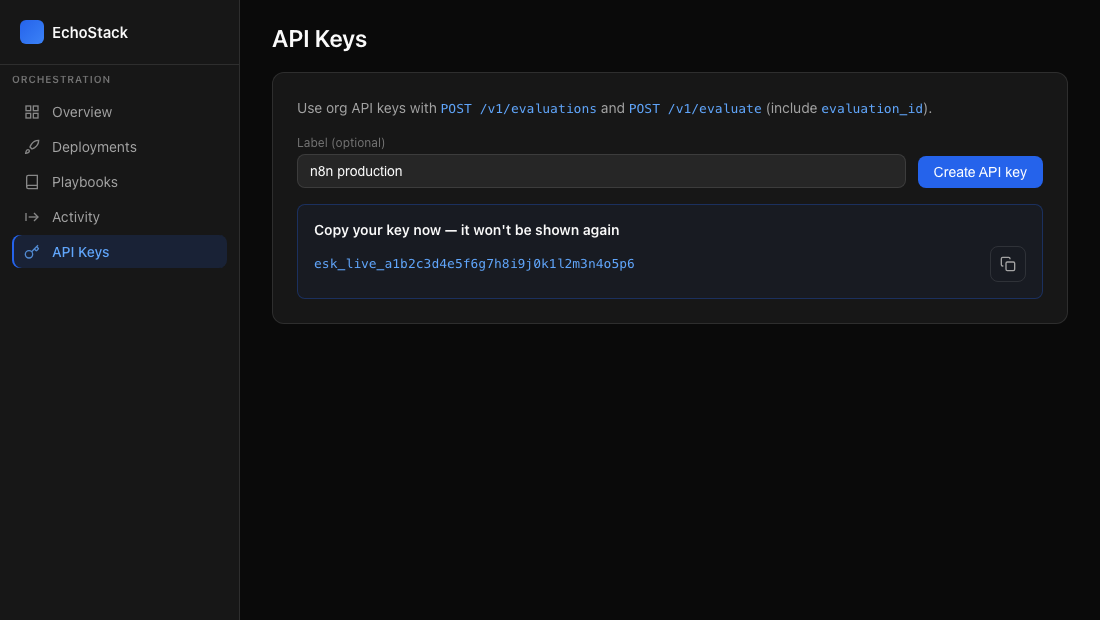
Dashboard → API Keys — create a key and copy esk_… immediately; it is shown only once.
2. Create an evaluation
POST https://api.getechostack.com/v1/evaluations
Authorization: Bearer esk_<your-key>
Content-Type: application/json

{
  "name": "ACME lead qualification",
  "template": "lead_qualification",
  "framework": "bant"
}
Intent detect example:
{
  "name": "igdm_inbound",
  "template": "intent_detect",
  "standard_detectors": ["pricing_interest", "purchase_interest", "needs_human"]
}
Response:
{
  "evaluation_id": "<uuid>",
  "detector_names": ["budget", "authority", "need", "timeline"]
}
Save evaluation_id for every evaluate call.
3. Evaluate
POST https://api.getechostack.com/v1/evaluate
Authorization: Bearer esk_<your-key>
Content-Type: application/json

{
  "evaluation_id": "<uuid-from-step-2>",
  "input_type": "transcript",
  "input": [
    {
      "role": "user",
      "content": "We have $100k budget, I'm the VP, need this live in Q2."
    }
  ],
  "options": { "request_next_action": true }
}
The compiled rubric is stored on your evaluation.
Ad-hoc evaluate (no create step)
For one-off or exploratory scoring, send create-shaped Criteria (same fields as create, without name) instead of evaluation_id. Do not send both.
POST https://api.getechostack.com/v1/evaluate
Authorization: Bearer esk_<your-key>
Content-Type: application/json

{
  "criteria": {
    "template": "lead_qualification",
    "framework": "bant"
  },
  "input_type": "transcript",
  "input": [
    {
      "role": "user",
      "content": "We have $100k budget, I'm the VP, need this live in Q2."
    }
  ],
  "options": { "request_next_action": true }
}
Response shape matches durable evaluate (id is the Evaluation Log id). Ad-hoc runs appear in the dashboard Activity feed as “Ad-hoc”; they are not fetchable via public GET /v1/evaluate/:id in v1.
Prefer a durable Evaluation when you need a stable id, deployment-scoped history, outcomes, or credential binding that should not resend Criteria (e.g. n8n / Zapier).
Response fields
| Field | Use |
|---|---|
status |
QUALIFIED, PARTIAL, FAILED, ESCALATE |
next_action |
Automation routing |
extracted_signals |
Per detector: { "found", "confidence" } |
extracted_fields |
Full extraction payload (same keys as signals) |
missing_fields |
Follow-up questions |
invalid_fields |
Detectors whose value failed validation (e.g. an out-of-categories classification). Coerced to not-found, but surfaced so you can spot a misconfigured detector. |
Branch in n8n / Make
Use $json.extracted_signals.pricing_interest.confidence (or .found) after evaluate — credential: org esk_ key + evaluation_id in the evaluate body.
4. Log an outcome (optional)
POST https://api.getechostack.com/v1/evaluations/<evaluation_id>/outcome
Authorization: Bearer esk_<your-key>

{
  "decision": "QUALIFIED",
  "actual_outcome": "converted",
  "conversion_value": 25000,
  "days_to_close": 47
}
Troubleshooting
| Issue | Fix |
|---|---|
| 401 Unauthorized | Use full Bearer esk_… or regenerate the key. |
| 400 XOR_REQUIRED | With esk_, send exactly one of evaluation_id or criteria — not both, not neither. |
| 400 FORBIDDEN_CRITERIA | criteria requires esk_. Deployment secret (ech_dw_) must not send criteria. |
| 400 MIXED_AUTH | Do not send evaluation_id with ech_dw_. Use esk_ + evaluation_id, or ech_dw_ alone. |
| 402 Quota exceeded | Check plan limits in the response. |
| 429 Rate limited | Retry after a short delay. |
API reference
OpenAPI: API reference.
Design partners
Shipping eval in production? See design partners on getechostack.com.